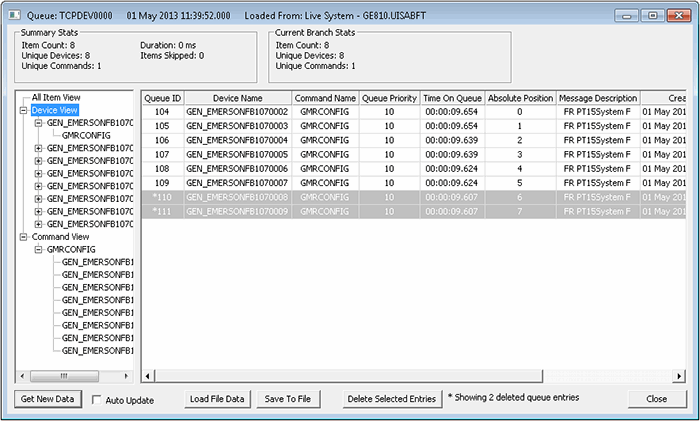
The View Message Queue option on the Import/Export Devices context menu opens a dialog box that enables you to view and manage messages in their respective queues. This dialog box enables you to see tree views of relevant information.
Click the following image to see a sample Queue dialog box:
See also Prioritizing Messages in the Communication Queue.
The following table lists and describes the options you can use to manage items on the communication queue dialog boxes.
| Options | Description |
|---|---|
|
Auto Update |
Check this option to automatically update the displayed queue every 3 seconds. |
|
Delete Selected Entries |
Highlight one or more queue entries and click this option to delete them from the queue. (Alternatively, highlight one or more queue entries and click Delete.) Deleting a queue entry means that the message will never be sent to the applicable device. Deleted entries are marked with an asterisk (*); a message appears at the bottom of the dialog box informing you of the total number of deleted queue entries currently displayed. |
|
Get New Data |
Click to manually update the displayed queue. |
|
Load File Data |
Click to load an XML file into the displayed queue. |
|
Save To File |
Click to save the displayed queue to an XML file. |
The following table lists and describes the various kinds of information displayed on the communication queue dialog boxes.
| Queue Information | Description |
|---|---|
|
Absolute Position |
This column represents the position of a message in the selected communication device's queue based on the creation time of the message. The earlier the creation time, the lower the absolute position number. |
|
All Item View |
Displays all pending messages for the selected communication device. |
|
Command Name |
This column displays the applicable command name for a queued message. |
|
Command Parameters |
This column displays applicable command parameters. See also Command Components. |
|
Command View |
Displays pending messages for the selected communication device based on the names of applicable UIS commands. Use to sort pending messages by UIS command name. |
|
Creation Time |
This column displays the date and time at which a message was created. |
|
Device Name |
Displays pending messages for the selected communication device based on the names of applicable remote devices. Use to sort pending messages by remote device name. |
|
Device View |
Displays pending messages for the selected communication device based on the names of applicable remote devices. Use to sort pending messages by remote device name. |
|
Duration |
The duration of the message. |
|
Item Count |
In the Summary Stats group, displays the total number of queued messages for the selected communication device. In the Current Branch Stats group, displays the total number of queued messages for the selected branch in the view hierarchy. |
|
Items Skipped |
The number of items in the queue skipped. |
|
Message Description |
A description of the message. |
|
Queue ID |
This column displays a system-assigned numeric identifier. |
|
Queue Priority |
This column displays a number. |
|
Time On Queue |
This column displays how long a message has remained on the queue. |
|
Unique Commands |
In the Summary Stats group, displays the total number of commands with messages queued for the selected communication device. In the Current Branch Stats group, displays the total number of commands with messages queued for the selected branch in the view hierarchy. |
|
Unique Devices |
In the Summary Stats group, displays the total number of remote devices with messages queued for the selected communication device. In the Current Branch Stats group, displays the total number of remote devices with messages queued for the selected branch in the view hierarchy. |

|
|
|

